How to stop scrolling and read the Bible instead
You already know the morning scroll is not how you want to start the day. Here is a plan that does not rely on willpower alone: put Scripture before the apps, and let your phone hold the line.
Updated
Start with the real number
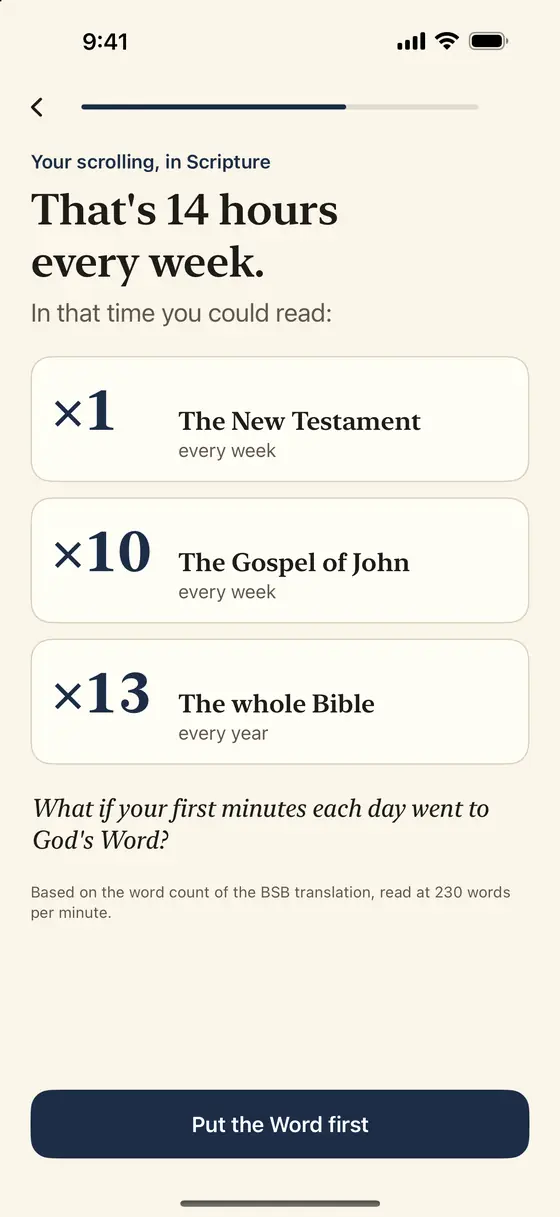
The first step is not guilt; it is arithmetic. Two hours a day is 14 hours a week. At a normal reading pace of 230 words per minute, that is the whole New Testament once a week, or the Gospel of John ten times. Psalmlock shows you this when you set it up, using the word counts of the Berean Standard Bible (BSB), and again every week with your real numbers.
Pay careful attention, then, to how you walk, not as unwise but as wise, redeeming the time, because the days are evil.
Ephesians 5:15–16 BSB
Make the Bible the first thing your phone offers
Willpower is weakest in the first minute after you pick up the phone. So move the decision earlier. In Psalmlock you choose the apps that pull you in and the hours they should stay locked; 6:00 AM to 10:00 PM is a common choice. When you wake up and tap one of them, you get a verse and a button instead of a feed. The button takes you to today's reading.
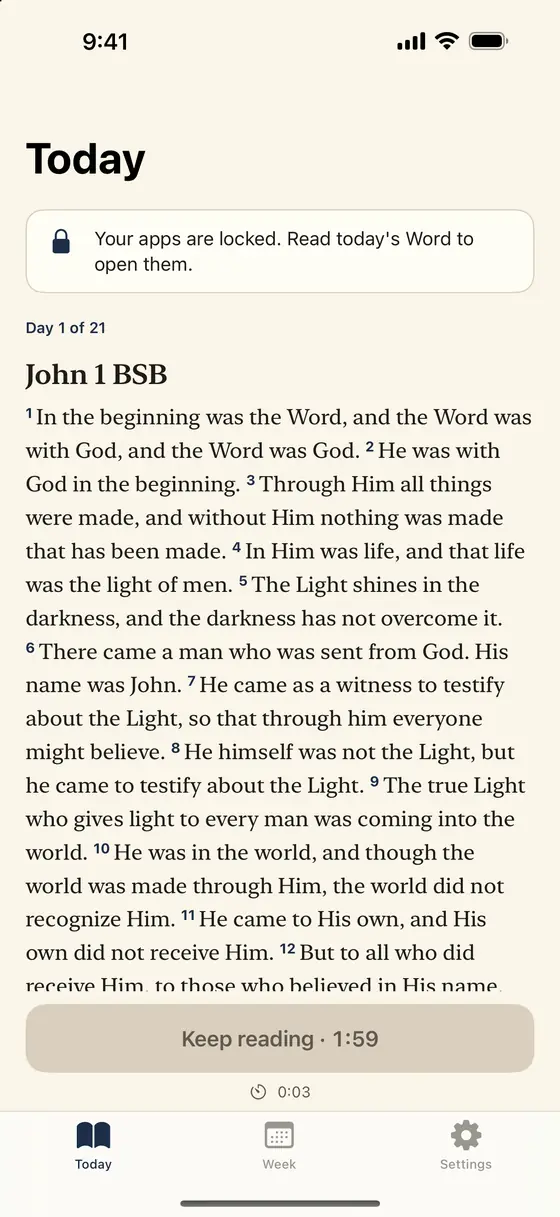
The passage is not random. You pick a plan through a whole book, such as John in 21 days, Psalms in 30, Proverbs in 31, or Mark in 16. Each day has a short prayer at the end. When a plan is done, the next begins, so there is always a next page.
Read one passage, not the whole Bible
Plans fail when the daily portion is too big. Psalmlock's daily reading is one chapter or one psalm, a few minutes. The "Amen" button waits a short while, scaled to the length of the passage, which keeps the reading honest without making it long. Then a prayer, and your apps open.
{verse('Your word is a lamp to my feet and a light to my path.', 'Psalm 119:105 BSB')}If you prefer another translation, you can open the same passage on bible.com from inside the app. Psalmlock itself uses public-domain translations: the BSB and WEB for Protestants, the WEB-C and Douay-Rheims for Catholics, plus Spanish and Portuguese.
Let the apps lock again
Reading in the morning does not stop a long scroll at lunch. That is what "Lock again after" is for. Within your lock hours, your apps lock again after 15, 30, or 60 minutes of use, and one more verse opens them. It is a small interruption, but it is a verse rather than a timer, and it comes with a one-line prayer.
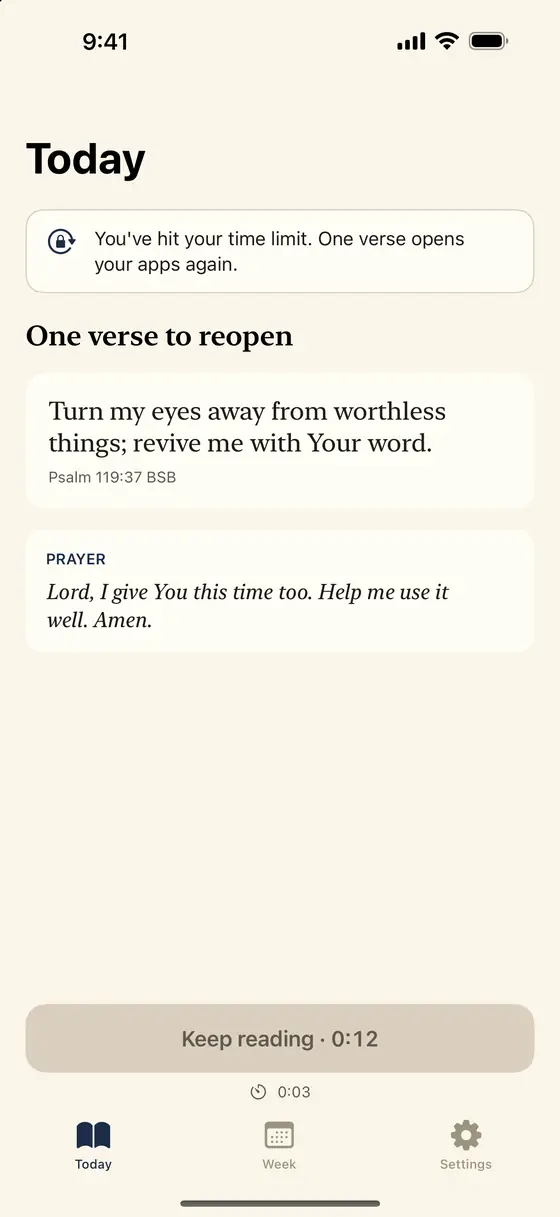
Psalmlock keeps 39 short verses for these moments, on attention, time, rest, and self-control, and rotates through them. For emergencies, "More options" on the locked screen opens an app for 5 minutes, once a day.
Choose when the lock ends
Not everyone wants a lock at 9 PM. Psalmlock's lock hours have an end time, and many people set it around 10:00 PM so the late evening is free. If evenings are where your scrolling happens, set the end time later; the lock follows your clock within the same day, and a new day starts at 3:00 AM.
What matters is that the first tap of the day lands on Scripture. Once that is true for a few weeks, the number on the Week tab starts to move on its own.
Keep a streak you can see
The Week tab shows minutes in the Word, your day streak, and total days, next to your real weekly scrolling converted into Scripture. Lock Screen and Home Screen widgets show today's verse and your streak. An optional evening reminder nudges you if you have not read yet. Your streak and progress live in your own iCloud account, so a new phone does not reset them.
Psalmlock is free to download and requires a subscription or a one-time purchase: Yearly (with a 7-day free trial for new subscribers), Weekly, or Lifetime. It needs an iPhone with iOS 17 or later, Screen Time on, a passcode, and an iCloud sign-in. Your Screen Time data stays on your iPhone; there is no account, no ads, and no tracking.
Frequently asked questions
How long does the daily reading take?
A few minutes. The daily portion is one chapter or one psalm from your plan, followed by a short prayer.
What if I wake up and need an app right away?
Apps you did not choose are always open. For a chosen app, "More options" on the locked screen opens it for 5 minutes, once a day.
Does Psalmlock lock my apps in the evening?
Only within the hours you set. Many people lock from the morning until 10:00 PM and leave the late evening free.
Can I read in my own translation?
Psalmlock shows public-domain translations (BSB, WEB, WEB-C, Douay-Rheims, and Spanish and Portuguese ones). You can open the same passage on bible.com from inside the app.